

Changelog
Forge version 6 (23 October 2026)
Section titled “Forge version 6 (23 October 2026)”Highlights
Section titled “Highlights”- ✅ SQL exports: add a SQL step to an export to deliver the result of a query instead of the raw rows - for example time spent in each status per assignee, or how many work items were reopened each week. The export editor shows the tables your export provides, runs your query on a sample as you write it, and you schedule a SQL export like any other: CSV, Excel or JSON, by email, download link, SFTP or API. Each run fetches fresh data from Jira, runs the query and delivers only its result. SQL exports are currently available for sites whose data is processed in the US region.
- ✅ Datasets for AI agents: the Rovo agent and AI tools can build a dataset from an export or a JQL query - the work items and their full change history - and answer questions about it with SQL, such as the 85th-percentile time in each status. A dataset holds only what you can see in Jira, nobody else can query it, and it is deleted when it expires (after at most 24 hours).
- ✅ The agent writes SQL reports: ask the Rovo agent for a report that needs aggregation, and it can write the SQL step for you, check it on a dataset and save it to your export, ready to schedule.
Improvements
Section titled “Improvements”- ✅ Redesigned schedule dialog: delivery methods are shown as tiles and the schedule reads as one sentence. Saving keeps the dialog open, so you can run a changed schedule straight away with Run now. Pause, resume, the execution log and delete are in the dialog’s menu.
- ✅ Clearer dashboard: each schedule takes one line, with new Last run and Next run columns. A schedule paused after repeated failures stays highlighted, and download links or emails with no recipients are flagged.
- ✅ The export editor now asks before you leave an export with unsaved changes.
Forge version 6 (19 October 2026)
Section titled “Forge version 6 (19 October 2026)”Highlights
Section titled “Highlights”- ✅ Rovo agent: Advanced Export now comes with a Rovo agent. Ask it in plain language to set up, schedule, run and check your reports. It acts with your Jira permissions, can only change what you own, and asks you to confirm every change. See Rovo agent and AI tools.
- ✅ AI tools (MCP): the same tools are available to your own Rovo Studio agents and, in early access, to other AI assistants that support the Model Context Protocol, such as Claude. See Using the tools in your own agents.
- ✅ Failure emails: the owner of a schedule is now emailed when a scheduled run fails or is interrupted, with the error and a link to the dashboard. Only the first failure after a successful run sends an email.
Improvements
Section titled “Improvements”- ✅ Execute now asks for confirmation in a dialog, then shows the run’s progress until it finishes.
- ✅ When an admin has restricted scheduling, the schedule dialog now explains why a schedule cannot be created or deleted.
- ✅ Security improvements to how exports, executions and downloads are restricted to the people allowed to see them.
- 🐛 Change history exports no longer split multi-value fields such as sprint names on spaces (“Sprint 2, Sprint 1” was exported as “Sprint,2,,Sprint,1”).
Forge version 6 (15 October 2026)
Section titled “Forge version 6 (15 October 2026)”- ✅ File name templates: choose the file name of a scheduled report, using
{name}and{date}placeholders with a date format of your choice, for example{name}_{date:YYYYMMDD}. The date is in the schedule’s time zone. Leave the template empty to keep the current file names. - ✅ Live run status: the dashboard, the schedule dialog and the execution log show a run’s progress while it is waiting or running, without reopening them.
Forge version 6 (24 September 2026)
Section titled “Forge version 6 (24 September 2026)”- ✅ Forge migration complete: the app no longer uses Atlassian Connect. The migration notice disappears once your Jira admin approves the update. See Forge migration.
Forge version 5 (23 September 2026)
Section titled “Forge version 5 (23 September 2026)”- ✅ Permissions update: this version asks your Jira admin to approve updated permissions, as part of the move to Forge. Until it is approved, the app keeps working as before. See Forge migration.
Forge version 4.13 (12 March 2026)
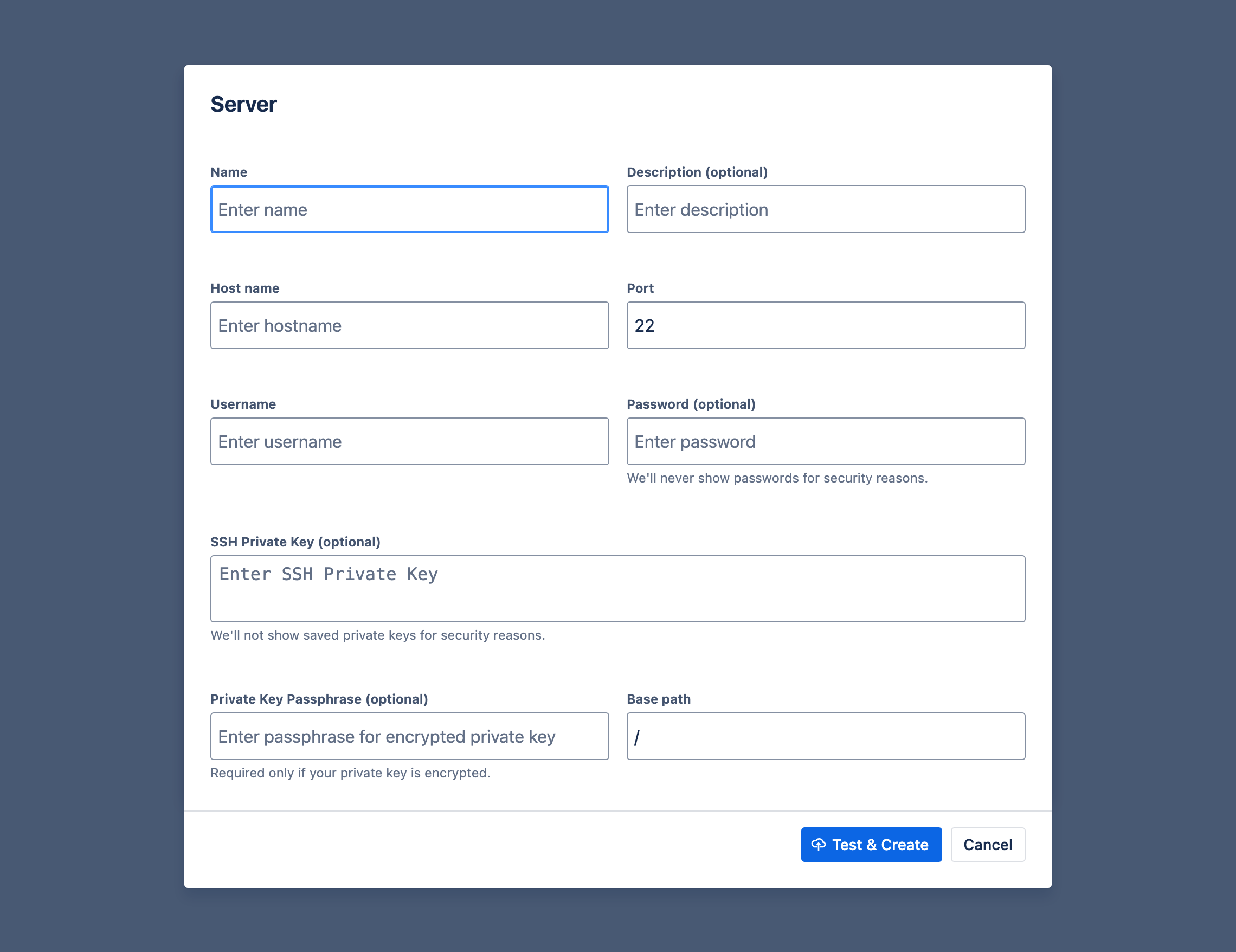
Section titled “Forge version 4.13 (12 March 2026)”- ✅ SSH Key Passphrase Support: SFTP connections now support encrypted SSH private keys. Users can provide a passphrase when configuring a server, which is securely encrypted and stored. The passphrase can be entered in Server configuration modal when editing SFTP Upload method for Schedule.
Forge version 3.0.0 (27th December 2025)
Section titled “Forge version 3.0.0 (27th December 2025)”Major Update: Forge Framework Migration
Section titled “Major Update: Forge Framework Migration”The application has undergone a significant transformation:
- ✅ Forge Framework Rewrite: The entire User Interface has been rewritten using the Forge framework.
- ✅ Sleeker Design: The new UI is sleeker and offers a more modern experience.
- ✅ Jira Standards Alignment: The interface is now more aligned with Jira standards, ensuring it feels like a native part of your Jira environment.
1.3.25-AC (2nd October 2025)
Section titled “1.3.25-AC (2nd October 2025)”- ✅ We’ve made fetching work items from Jira more reliable by adding retries in case of temporary Jira API errors.
1.3.24-AC (25th March 2025)
Section titled “1.3.24-AC (25th March 2025)”- ✅ When exporting history of issues, we now export 2 new columns: Change Start and Change End. The column As of Date has been removed in favour of Change Start and Change End. The new columns describe in more obvious way the period in which issue field values were present.
1.3.23-AC (2nd March 2025)
Section titled “1.3.23-AC (2nd March 2025)”Highlights
Section titled “Highlights”- ✅ We now allow selecting the geographical region where the scheduled reports are processed. This means, that if you are in Europe, you can choose to have your reports processed and temporary data stored in Europe. This is useful if you have to comply with GDPR or other data protection regulations. We currently support 2 regions: US and Europe.
1.3.21-AC (14th October 2024)
Section titled “1.3.21-AC (14th October 2024)”Highlights
Section titled “Highlights”- ✅ Added Support for SSH Key Authentication for SFTP Server Uploads
- You can now use SSH private keys to authenticate when uploading scheduled reports to an SFTP server. This enhancement improves security by allowing key-based authentication instead of traditional password-based methods.
1.3.20-AC (23rd August 2024)
Section titled “1.3.20-AC (23rd August 2024)”Highlights
Section titled “Highlights”- ✅ added support for Jira Service Management Assets field in scheduled reports
- Exported Assets fields contain their labels for now, although you’ll soon be able to customise the format fields are exported in (e.g. export asset’s attribute instead).
- Assets are only supported in scheduled reports at the moment. Preview and export from the browser will result in values being exported as “<Assets only supported in scheduled reports>”.
- To read more about Assets in JSM, check Atlassian’s documentation.
1.3.19-AC (22nd April 2024)
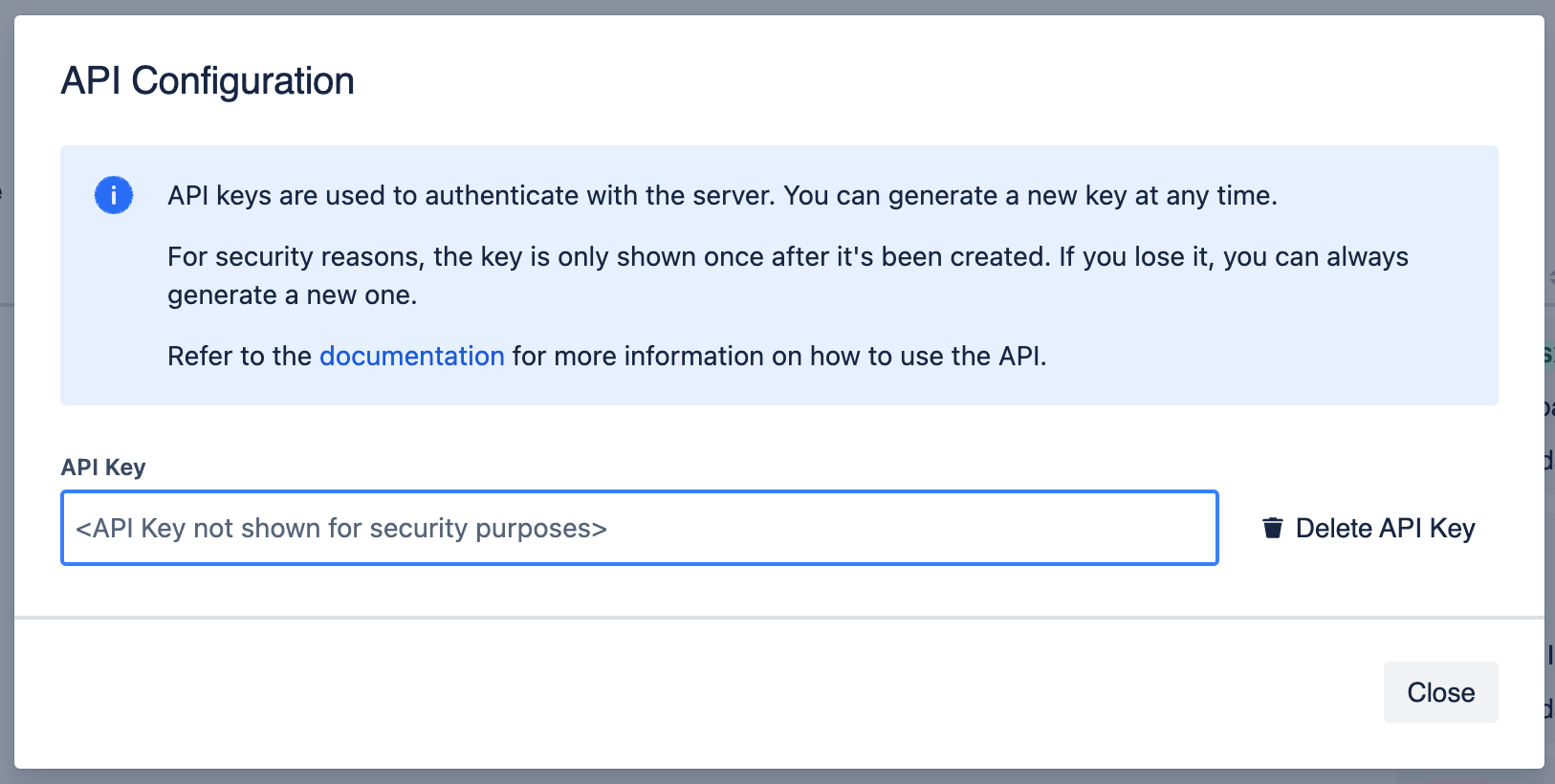
Section titled “1.3.19-AC (22nd April 2024)”We’ve added the ability to accees results of scheduled exports via API. This is useful if you want to integrate the results with other systems or if you want to build your own dashboard.
API is authenticated using API Key. To generate an API Key, go to the Advanced Export Dashboard, click Settings -> API Configuration.:
Highlights
Section titled “Highlights”- ✅ new scheduled exports delivery method: API
- ✅ API v1: Ability to query schedules, schedule details and download reports (for schedules with API delivery method) via API at https://ae.kanbanalytics.com/api/1
1.3.18-AC (25th March 2024)
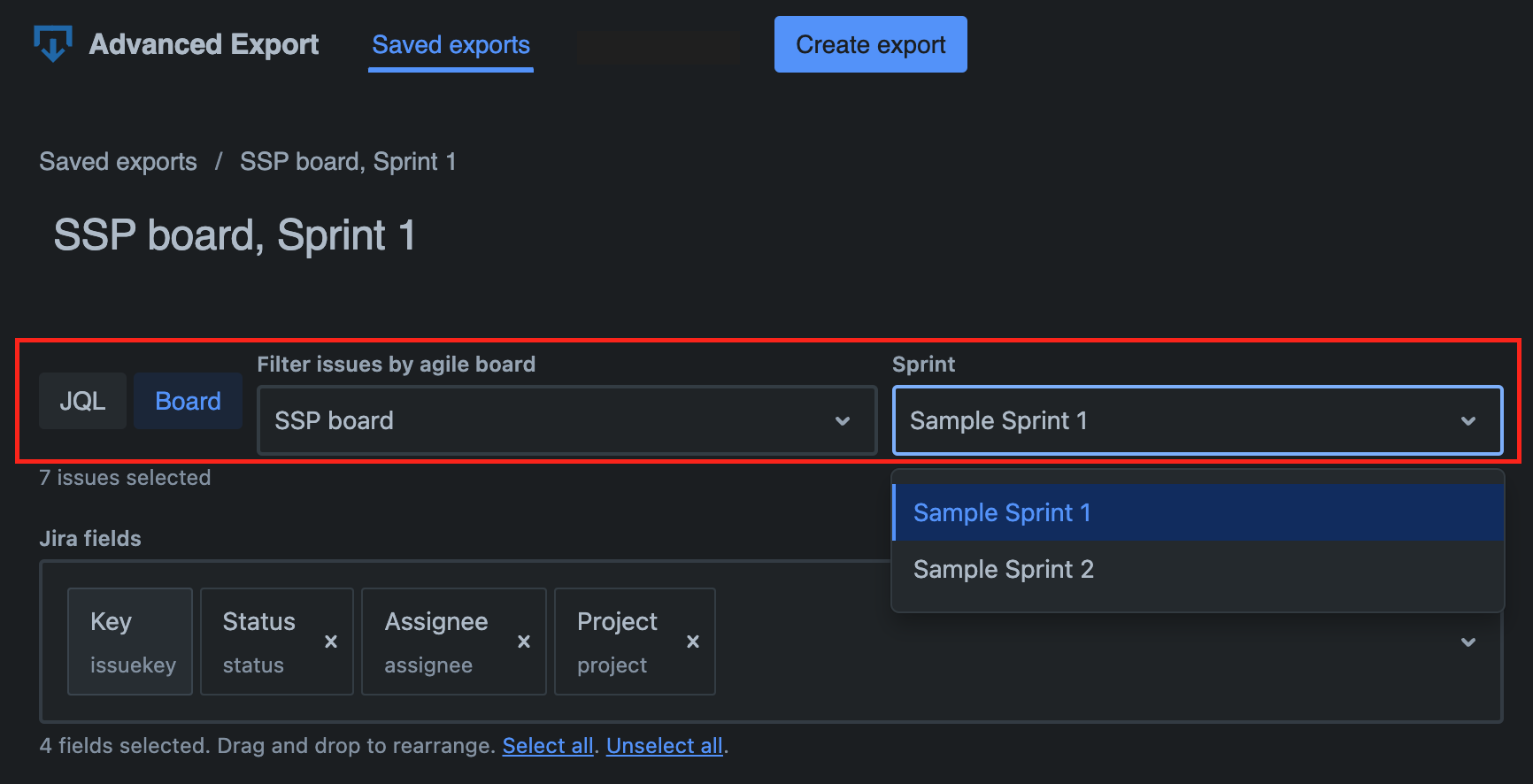
Section titled “1.3.18-AC (25th March 2024)”You can now export issues by agile board and sprint. You don’t have to use JQL or filters, just select the board and sprint you want to export.
You can of course schedule exports saved with board and sprint filter as well.
Highlights
Section titled “Highlights”- ✅ For Jira Software users: Filter issues by agile board and sprint
- 🐛 Minor usability fixes
1.3.17-AC (24th February 2024)
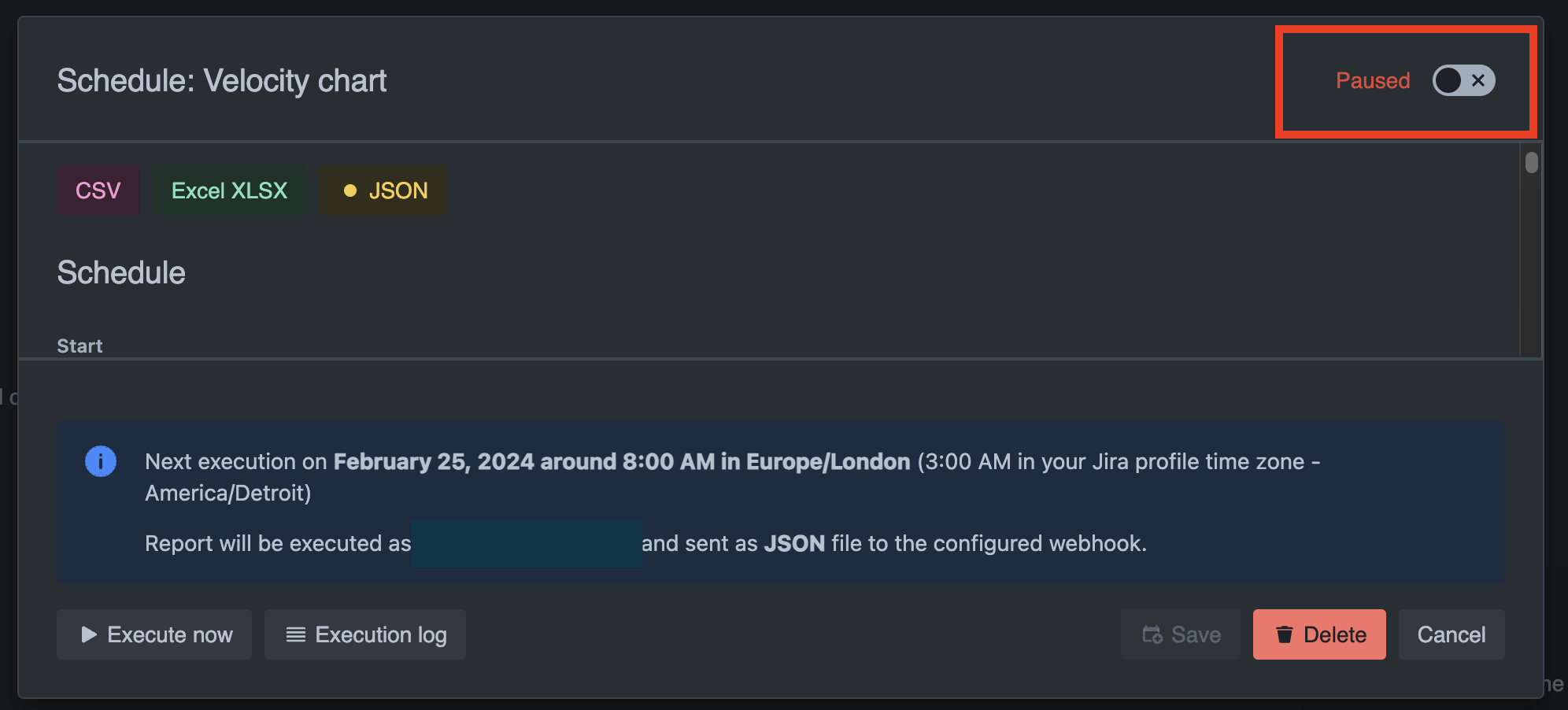
Section titled “1.3.17-AC (24th February 2024)”We’ll pause the scheduled reports automatically after 5 or more failures in a row.
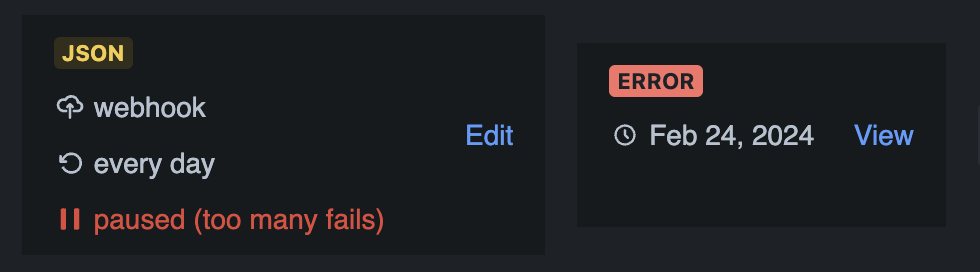
To reactivate the reports, go to Schedule modal and toggle the “Paused” switch in the upper right corner.
Highlights
Section titled “Highlights”- ✅ Scheduled reports: Ability to pause scheduled reports
- ✅ Scheduled reports: Pause reports automatically after 5 or more failures in a row
- ✅ Schedule modal: Cosmetic changes to the footer
- 📄 We started calling “scheduled exports” “scheduled reports”.
1.3.16-AC (9th January 2024)
Section titled “1.3.16-AC (9th January 2024)”New method of delivering scheduled reports: webhooks.
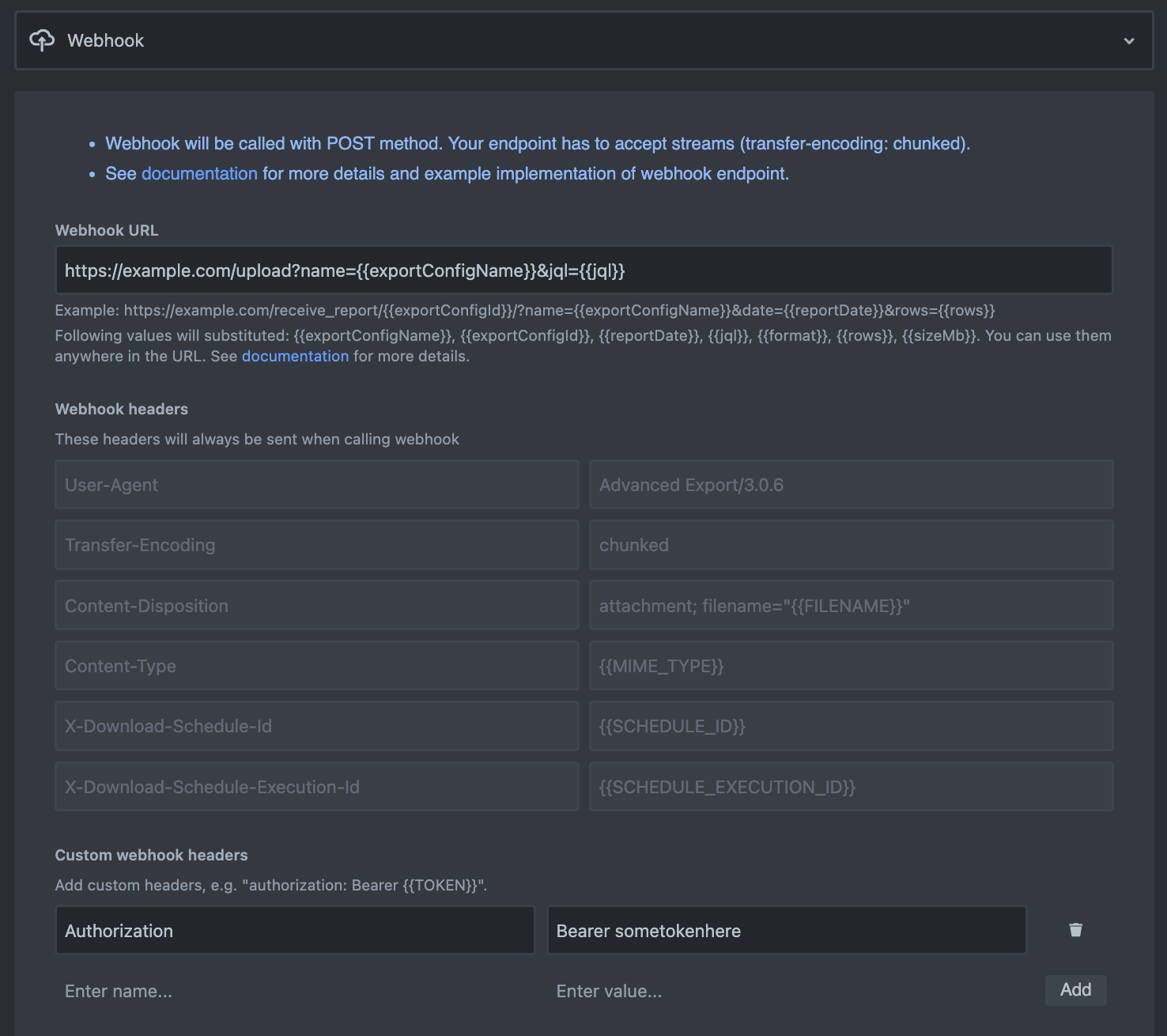
You can now specify a webook URL, and custom headers which will be used to send a POST request. Payload of the request will be the report file.
There’s an example implementation of the webhook endpoint in the scheduled exports documentation.
Highlights
Section titled “Highlights”- ✅ Scheduled reports: Ability to send scheduled reports via webhooks
1.3.15-AC (6th January 2024)
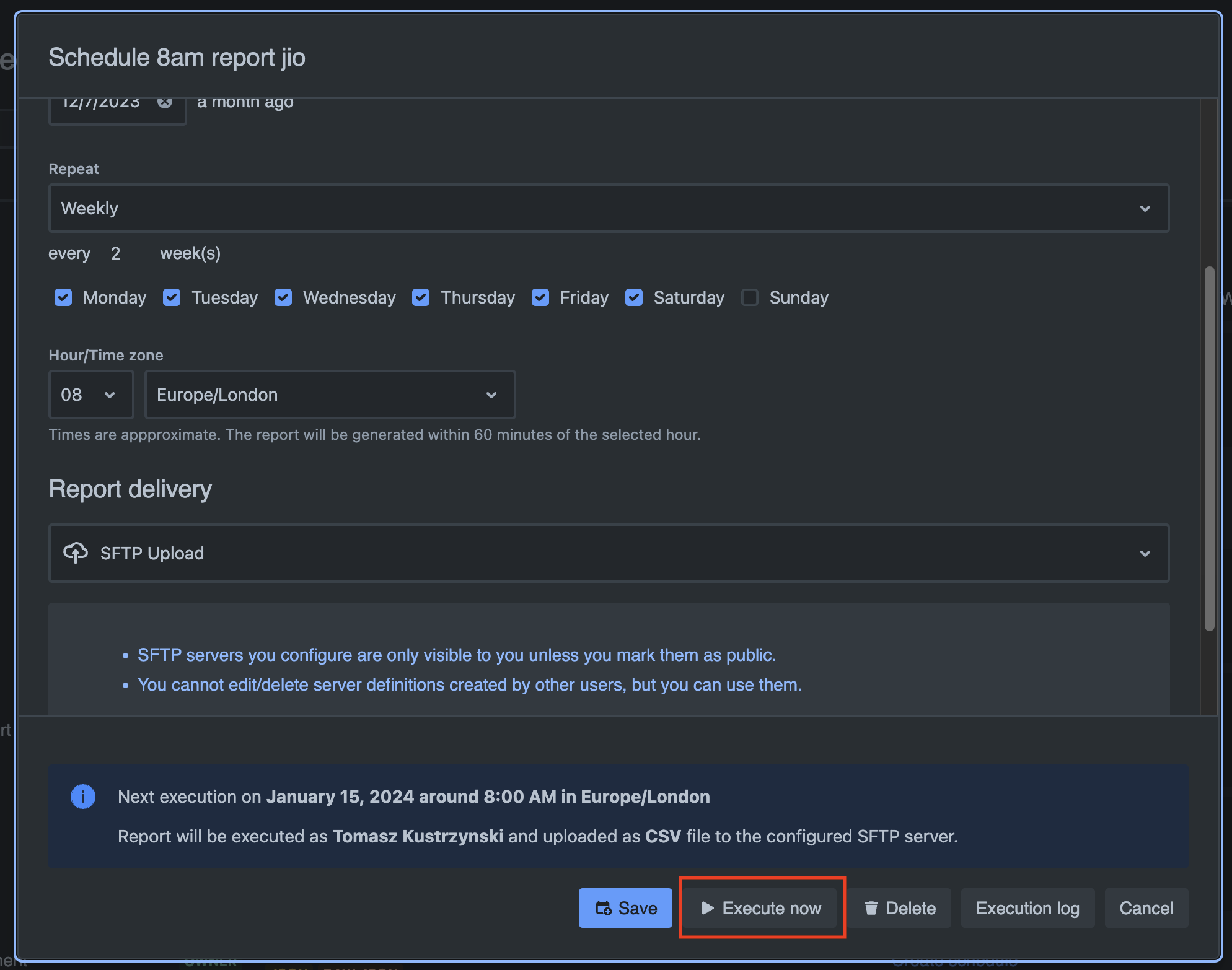
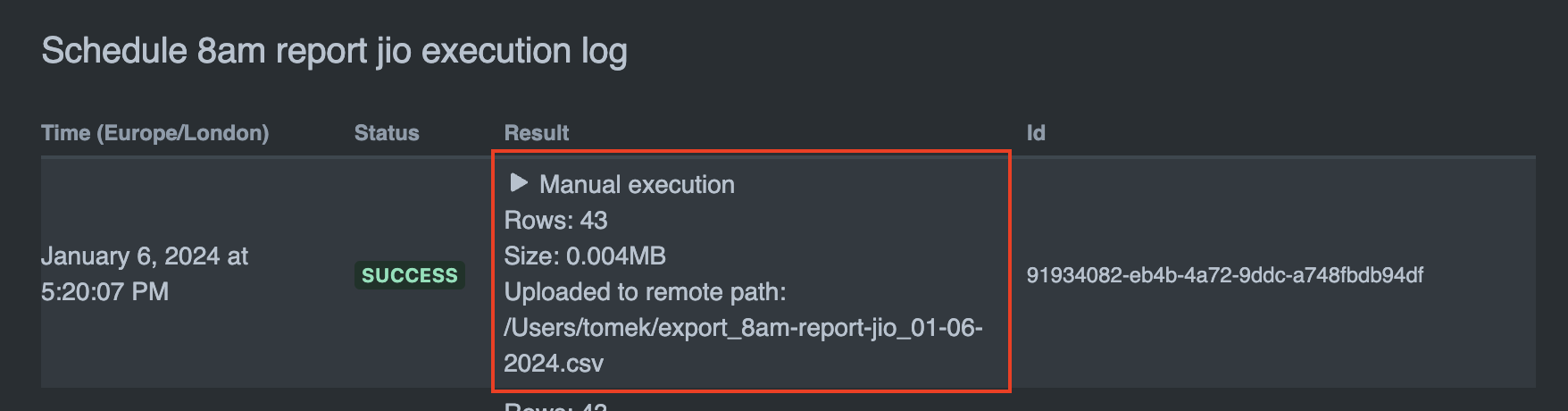
Section titled “1.3.15-AC (6th January 2024)”Added ability to execute scheduled exports manually at any time. This is useful if you want to test your scheduled exports or if you want to generate a report right now. Depending on the configuration, it will send notification emails, upload to SFTP server etc.
Execute now button in the schedule dialog:
Example of manual report execution in the execution log:
Highlights
Section titled “Highlights”- ✅ Scheduled reports: Ability to execute scheduled report manually at any time
1.3.14-AC (4th January 2024)
Section titled “1.3.14-AC (4th January 2024)”Added support for SFTP server upload for scheduled reports. This means you now have 3 ways to delivery your reports:
- email attachments
- download link
- SFTP server upload
Highlights
Section titled “Highlights”- ✅ Scheduled reports: Ability to upload scheduled reports to an SFTP server
- ✅ SFTP server management modal (add/edit/delete)
- ✅ Support for Parent link field
- 🐛 Parent issue field wasn’t exporting data
1.3.13-AC (31st December 2023) 🎉🎉🎉
Section titled “1.3.13-AC (31st December 2023) 🎉🎉🎉”We’re ending the year with a release of a feature requested by many of our customers - 🎁 the ability to download large report files.
Scheduled reports were previously sent as email attachments, which meant they were limited to 25MB in size. You can now choose to receive reports via “download link”, which allows you to download reports of any size.
Highlights
Section titled “Highlights”- ✅ Scheduled reports: Ability to download large reports via a link (sent in an email and available in the dashboard). This is an alternative to receiving reports as email attachments.
- ✅ Dashboard: Presentation of schedule preview and execution log in the dashboard has been improved.
- ✅ Email templates for scheduled reports: New variable available: “dashboardUrl”.
- ✅ Help menu now contains link to the service desk portal.
- 🐛 Fixed: Export preview crashed when switching from “raw JSON” to CSV format.
- 🐛 Fixed: Schedule modal: weekly schedule didn’t correctly show selected report days.
- 🐛 Fixed: Several minor visual issues
1.3.10-AC (15th December 2023)
Section titled “1.3.10-AC (15th December 2023)”This is a release addressing few issues reported by users and improving overall user experience.
- [feature] Added locale support. By default, new export configurations will pick up locale from your Jira profile. You can change it to whatever you like in the “Format” tab of export config settings. Locale will affect how dates and numbers are formatted.
- [feature] Reorganised settings for export configurations (they’re now grouped in 3 tabs: Data, Format, CSV specific settings).
- [feature] You can now live preview raw JSON format too (apart from simplified JSON).
- [feature] You can not reorder fields which were previously locked in place: “Key”, “Created” and 4 fields added when exporting history: “As Of”, “Changed Fields”, “Change Author” and “Time to Next Change”.
- [feature] Option to add empty line after every issue when exporting history of changes.
- [change] JSON export - fields which are computed (i.e. not received directly from Jira) are now prefixed with “ae_”. There are currently 4 of them: “ae_asOf”, “ae_changedFields”, “ae_changeAuthor”, “ae_timeToNextChange”
- [change] The details in the dashboard list of export configs now shows if the history is exports, and what locale the export uses
1.3.8-AC (12th December 2023)
Section titled “1.3.8-AC (12th December 2023)”We have reworked the UI for the whole application! It is now consistent with Jira interface and should be easier to use.
Highlights
Section titled “Highlights”- [feature] dark mode support
- [feature] simplified JSON export
- [fix] JSON exports now format dates in ISO 8601 format
- [fix] changes to Excel export - types for numbers and dates and now properly exported which means Excel can interpret them as such and use its configured locale for formatting
1.3.7-AC (24th June 2023)
Section titled “1.3.7-AC (24th June 2023)”Highlights
Section titled “Highlights”We have added the ability to use SendGrid as an email provider. This way you can start sending reports using your email service which is useful if you want emails coming from your domain. Set up is simple and requires API Key which can be obtained from your SendGrid account. For more information refer to App Settings page.
- [feature] Ability to use SendGrid as an email provider.
1.3.3-AC (16th June 2023)
Section titled “1.3.3-AC (16th June 2023)”Highlights
Section titled “Highlights”- [feature] Ability to set permission to create scheduled reports in the Admin -> Apps settings page
1.3.2-AC (3rd June 2023)
Section titled “1.3.2-AC (3rd June 2023)”Minor changes and enhancements to Scheduled Exports options basef on the feedback.
Highlights
Section titled “Highlights”- [feature] Scheduled reports: We rearranged email options in the dialog to make it more readable
- [feature] Scheduled reports: Ability to define templates for email subject and text. You can include any text in your report email and use variables like number of exported rows, size of the report file etc.
1.3.1-AC (31st May 2023)
Section titled “1.3.1-AC (31st May 2023)”We’re continuing to work on improving Scheduled Exports based on the feedback from our lovely customers!
Highlights
Section titled “Highlights”- [feature] Scheduled reports: Ability to compress exported files using ZIP. This typically reduces size of the file 10 times, which is useful given size limit for email attachement sent by our system is 25MB.
- [feature] Scheduled reports: Ability to set the exact hour of when report should be generated (in a time zone of your choosing). The report is generated within 60 minutes time window from the selected hour.
- [fix] Scheduled reports: There were cases reports didn’t get generated because our system got overloaded. We scaled the backend up accordingly and everything seems to be running smoothly now!
- [fix] Saving of export configuration with long JQL statement failed. JQL can now have up to 2048 characters.
- as usual, a host of other smaller improvements
1.3.0-AC (18th May 2023)
Section titled “1.3.0-AC (18th May 2023)”This is a major release with several new features.
The most notable one is ability to schedule recurring exports.
You can still use Advanced Export as before, for exporting directly via browser (in which case they’re generated on the fly, in the browser), however we find scheduling recurrent exports just so much more convenient!
Highlights
Section titled “Highlights”- [feature] Added Dashboard where you can create/view/edit or schedule defined exports.
- [feature] Ability to schedule recurrent exports (daily, weekly on specified day of the week, monthly, yearly).
- [fix] Fixed error retrieving saved exports when page left open for a long time (error 401 caused by expiring Jira security token).
- [fix] Other minor fixes and improvements.
Visual and usability improvements.
Highlights
Section titled “Highlights”- [feature] Visual changes to the export creation page. Download/Schedule buttons are now at the bottom.
- [improvement] Warn when leaving the export screen if there are unsaved changes.
- [fix] Fixed issues when Excel export would fail because a cell contains more than 32767 characters (that’s an Excel limitation). We truncate the cell content to 32767 characters.
- [fix] Other minor fixes and improvements.